Dispatching a Charter Flight
Access the Flight Center via the icon in the left sidebar.
You will be presented with the My Flights screen, which will show any dispatched flights that are ready to be flown.
Create a Charter Flight
A Charter Flight is merely a flight that you create on your own, based on whatever flight criteria you desire.
To create a new Charter Flight, click the Dispatch Charter button.
Provide Charter Flight Details
On the "Charter a Flight" screen, populate the details required to create the flight. All fields except for the route are required.
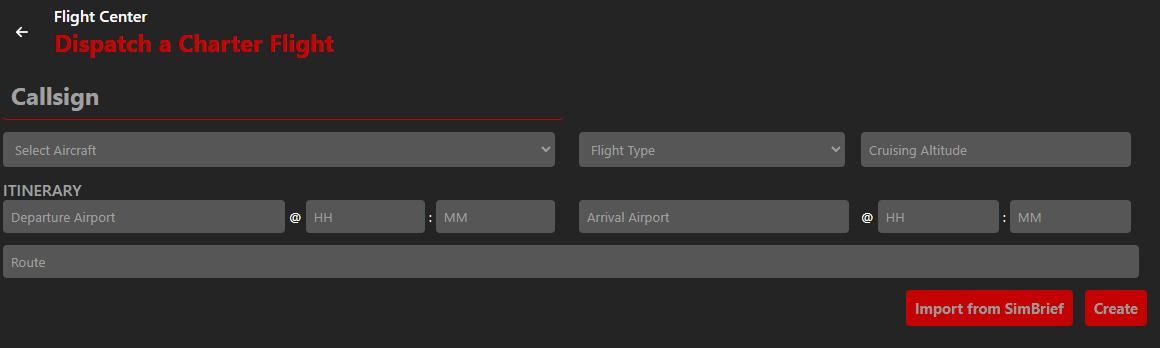
Here is an explanation of each field:
- Callsign
- This may be a real-world flight number, such as ACA80, or your pilot callsign, such as CAN1001.
If in doubt, use your pilot callsign.
- Aircraft
- Choose the aircraft you plan to fly based on the list of SimBrief supported airframes. If the plane you intend to fly is not in the list, choose the next closest match.
- Flight Type
- Choose between Passenger and Cargo
- Cruising Altitude
- Specify the altitude you plan to fly at. SmartCARS 3 will use that to determine when you've reached the cruise stage.
- Departure Airport
- Select from our list of over 80,000 airports based on data from OpenAIP and OurAirports
- HH
- Provide the estimated departure time in 24 hour format
- MM
- This is the estimated departure minutes
- Arrival Airport
- Select from our list of over 80,000 airports based on data from OpenAIP and OurAirports
- HH
- Provide the estimated arrival time in 24 hour format
- MM
- This is the estimated arrival minutes
- Route
- This is an optional description of the route
If you have the SimBrief plugin installed, you may click the Import from SimBrief button to import all the required data.
Click the Create button to create the Charter Flight.