
Your flight report
Every flight you file gets a report card: an image with a score out of 100, ready to save or share. Flights flown with CAVacars 2 get the full flight report, which scores the whole flight: your landing plus ten procedure checks, from landing lights to taxi speed. Other flights get a landing report, which scores the touchdown only.
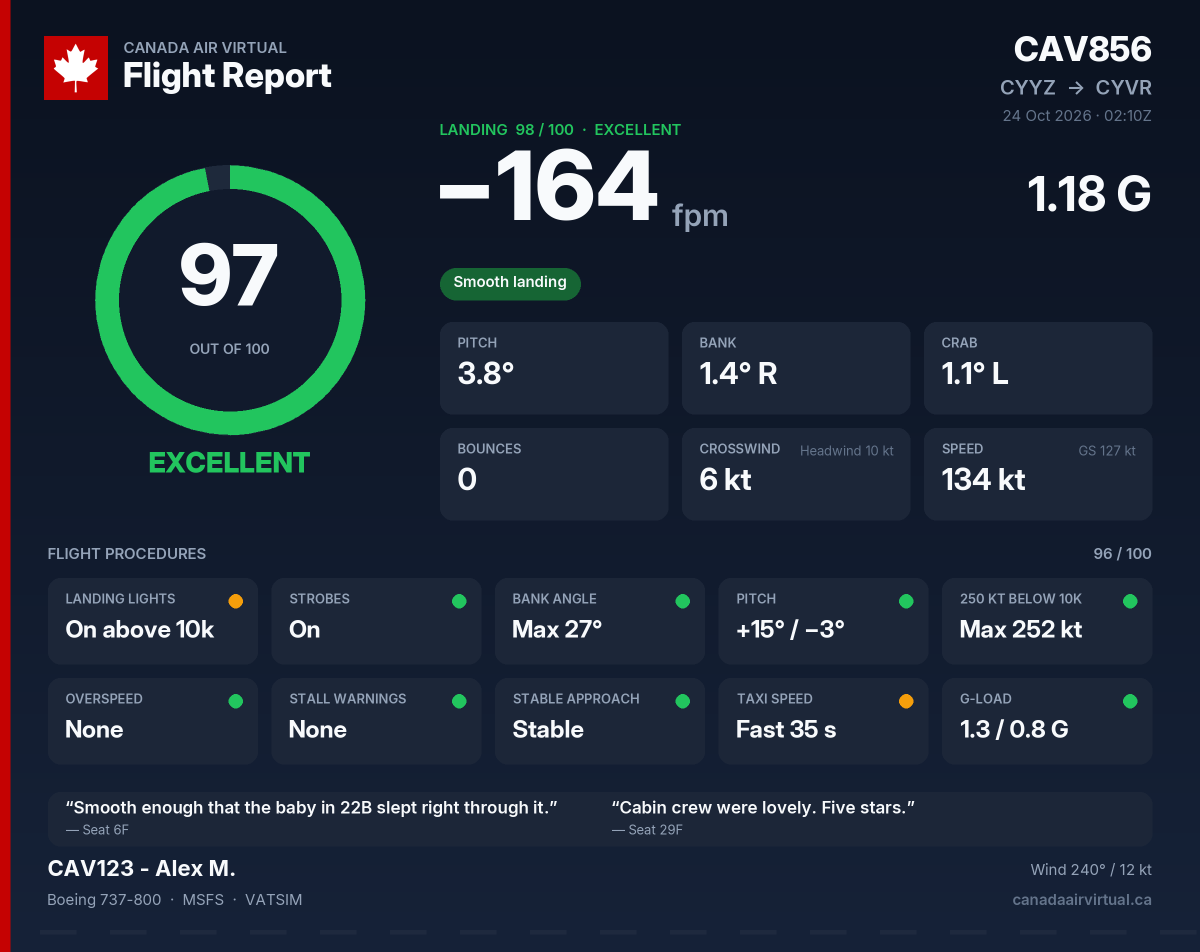
Where you'll see it
- In CAVacars 2, in the summary that pops up after you file. Click the card to open it full size, or Save image to download it.
- On the website, on the PIREP details page, with buttons to share, copy or download it. Below it you'll find the procedure checks and every touchdown number.
- In Discord, in the arrival post for your flight, together with your score.
Anyone with the link can open your report, so you can paste it anywhere. The link only works for that one flight.
Flight report or landing report?
| You filed with | You get |
|---|---|
| CAVacars 2 1.1 or later | A flight report: flight score, landing score and procedure checks |
| Older CAVacars 2 versions | A landing report |
| smartCARS 3, FsACARS | A landing report from the touchdown in your flight log, or from the landing rate alone if the log has none |
| Manual PIREP | No report |
A landing report from another app's log says so at the bottom of the card. Those apps record less, so values they don't have count as normal, and pitch isn't scored.
What's on the card
- Score and grade, in the ring on the left. On a flight report that's the flight score, with the landing score just above the rate.
- Rate (fpm) and G-force, the two landing numbers that count most.
- Notes: short tags for what went well with the landing, such as Butter, or what cost you points, such as Bounced or Wing low.
- Pitch, bank, crab, bounces, crosswind and speed at touchdown. Next to the crosswind is the headwind or tailwind, and next to your airspeed is your ground speed.
- Flight procedures (flight report only): ten tiles, each with a dot: green for full marks, amber for some points lost, red for most or all of them lost, grey when the check didn't apply to your flight.
- Overheard in the cabin: what your passengers had to say (see below).
- Weather at touchdown, if it was raining or snowing or the visibility was low, and the wind.
- Your flight number, route, aircraft and sim, and whether you flew on VATSIM or IVAO or with SayIntentions.AI ATC. CAV checks this itself about once a minute while you're moving, and CAVacars 2 shows what it found in the status bar next to REC. A network or SayIntentions shows on the report when it was seen at least 3 times, in at least half of the checks. VATSIM and IVAO need your ID on your CAV profile, and SayIntentions needs your SayIntentions API key there.
See Achievements: Your Landing Data for how each touchdown number is measured.
The flight score
The flight score is out of 100:
- 30 points come from your landing score.
- 70 points come from the procedure checks.
Flight score = 30% of the landing score + 70% of the procedures score
In the example above, a 98 landing and a 96 procedures score make 0.3 × 98 + 0.7 × 96 = 96.6, so a flight score of 97.
A crash scores 0.
| Flight score | Grade |
|---|---|
| 90–100 | Excellent |
| 75–89 | Good |
| 60–74 | Fair |
| 40–59 | Needs work |
| 0–39 | Poor |
The procedure checks
Each check is worth a number of points. The procedures score is the share of those points you kept, out of 100. The 70 points of the flight score are split between the checks like this when they all apply:
| Check | Weight | Worth in the flight score |
|---|---|---|
| Landing lights | 10 | 9.3 |
| Bank angle | 10 | 9.3 |
| 250 kt below 10,000 ft | 10 | 9.3 |
| Overspeed | 10 | 9.3 |
| Stable approach | 10 | 9.3 |
| Strobes | 5 | 4.7 |
| Pitch | 5 | 4.7 |
| Stall warnings | 5 | 4.7 |
| Taxi speed | 5 | 4.7 |
| G-load | 5 | 4.7 |
A check that doesn't apply to your flight is left out, and the others share its points. For example, the 250 kt check is skipped if you spent less than a minute below 10,000 ft, and the approach check if no approach was recorded.
Like the landing score, every check has a free allowance: nothing below it costs anything, so a light switched on a few seconds late or a takeoff roll through taxi speeds doesn't hurt. Above it, the loss grows steadily until the check is worth nothing. Times are in the air after takeoff and don't include time paused, unless the table says otherwise. Altitudes for the 10,000 ft checks are above sea level.
| Check | What's measured | Free up to | All points lost at |
|---|---|---|---|
| Landing lights | Time with the landing lights off below 10,000 ft | 30 s | 5 min |
| Time with them on above 10,000 ft (the lesser slip: half the points at most) | 2 min | 15 min (half the points) | |
| Strobes | Time with the strobes off in the air | 30 s | 5 min |
| Bank angle | Steepest bank | 33° | 50° |
| Time banked past 32° | 10 s | 1 min | |
| Pitch | Highest nose-up pitch | 20° | 30° |
| Lowest nose-down pitch | 10° down | 20° down | |
| 250 kt below 10,000 ft | Time faster than 260 kt indicated below 10,000 ft (250 kt plus 10 kt grace) | 10 s | 2 min |
| Overspeed | Time with your aircraft's overspeed warning on | 3 s | 1 min |
| Stall warnings | Stall warnings above 300 ft above the ground (the horn in the flare doesn't count) | none | 2 warnings (half the points each) |
| Stable approach | On your last approach, between 1,000 and 50 ft above the ground: time sinking faster than 1,000 fpm | 5 s | 20 s |
| Gear not down passing 500 ft above the ground | 60% of the points lost | ||
| Taxi speed | Time on the ground between 30 and 45 kt ground speed, before takeoff or after landing (the first 45 s after touchdown don't count) | 20 s | 2 min |
| G-load | Highest G above 100 ft above the ground | 1.8 G | 2.5 G |
| Lowest G above 100 ft above the ground | 0.3 G | −0.2 G |
Where a check has two rows, the worse of the two counts. On a go-around, only the final approach counts for the stable approach check.
A normal airline flight scores in the 90s. Lights on below 10,000 ft and off above, strobes on, no more than 25–30° of bank, 250 kt below 10,000 ft, gear down early and a steady approach, and walking pace on the taxiways. In the example above, the landing lights were left on for 8 minutes above 10,000 ft and the taxi was a bit quick for 35 seconds, which cost 3 of the 75 procedure points.
On the map
The flight map on your PIREP page shows where things happened. Each kind of marker has its own colour, and the legend in the corner turns each group on or off:
- Flight phases (blue): takeoff, top of climb, top of descent, approach, final and touchdown. Click the touchdown for your landing score.
- Scorecard (amber, or red for the serious ones): every procedure check that cost you points, at the place it happened. Where a lapse lasted a while, like landing lights left off on the way down, the stretch of your route is highlighted from where it started to where it ended. Lapses within the free allowance aren't shown, just as they don't cost points.
- Gear, flaps and lights, radios and other log entries: the rest of your flight log. Radios and other entries are hidden until you tick them.
Highlighted stretches need CAVacars 2 1.6 or later; older flights show the scorecard markers the flight log can place.
The landing score
You start with 100 points and lose some for each thing that wasn't ideal. Nothing below the "free" limit costs anything. Above it, the penalty grows steadily up to the maximum.
| What | Free up to | Penalty |
|---|---|---|
| Rate | 120 fpm | Up to −10 at 300 fpm, −40 at 600 fpm, and −60 at 1,000 fpm or more |
| G-force | 1.3 G | Up to −20 at 2.0 G |
| Bounces | none | −10 per bounce, −20 at most |
| Bank | 2° | Up to −15 at 7° |
| Crab | 3° | Up to −10 at 8° |
| Pitch | 0 to 9° nose up | −10 for touching down nose low (below 0°). Up to −15 at 12° nose up, where tail strikes start |
A crash scores 0.
| Landing score | Grade |
|---|---|
| 90–100 | Excellent |
| 75–89 | Good |
| 60–74 | Firm |
| 40–59 | Hard |
| 0–39 | Very hard |
A normal landing scores well. An airline-style touchdown of 150–250 fpm with the wings level and the nose lined up lands in the 90s. You don't need a greaser for a top score, so don't float down the runway chasing one.
The notes
| Note | When |
|---|---|
| Butter | 0 to −60 fpm, 1.15 G or less, under 2° of bank and no bounce (the same as the Butter achievement) |
| Smooth landing | A score of 90 or more with nothing to flag |
| Firm touchdown / Hard touchdown | Harder than 300 fpm / harder than 600 fpm |
| High G | Over 1.3 G |
| Bounced | One or more bounces |
| Wing low | Over 2° of bank |
| Not de-crabbed | Over 3° of crab |
| Nose wheel first / Tail strike risk | Pitch below 0° / above 9° |
At most three notes are shown, worst first.
Overheard in the cabin
Your passengers have opinions too. Every report comes with two or three short comments from the cabin about your flight, for example:
“Did we land yet?” — Seat 14C
“I counted 3 landings. Do I get 3 sets of miles?” — Seat 22D
“That sunset on approach! I took forty photos.” — Seat 9A
They're made up, just for fun, and they never count toward your scores. What the passengers talk about depends on how the flight went:
- The landing, always: a greaser, a firm or hard arrival, bounces, a wing low, a crab you didn't take out, or a straight landing in a strong crosswind.
- The ride, for flights flown with CAVacars 2: a smooth flight, turbulence or high G, steep turns, a quick descent, a stall warning, time acceleration or a long pause. If nothing stood out, you get some cabin small talk instead.
- Something extra, when it fits: rain or fog on arrival, landing at night, sunrise or sunset, a very short hop or a long haul, or flying online on VATSIM or IVAO, or with SayIntentions.AI.
On a cargo flight the cargo does the talking, and on a ferry flight there's only the crew member riding along in seat 1A. A flight counts as cargo when it was booked as one, or when its tour, event, ferry flight or aircraft mentions cargo or freight.
You'll find the comments in the post-flight summary in CAVacars 2, on the PIREP details page (all of them), and on the report image (the first two). The same flight always gets the same comments.
What the scores are for
The scores are for fun, bragging rights and getting better. They don't decide whether your PIREP is approved (see Filing your PIREP), and they don't count toward achievements on their own.